Published post
Master Prompt for Palm-Leaf Statue Cinematic Storyboard and Veo Video
A complete master prompt for generating a palm-leaf statue cinematic storyboard with 8 scenes, two 4-panel image grids, and matching Veo video prompts.
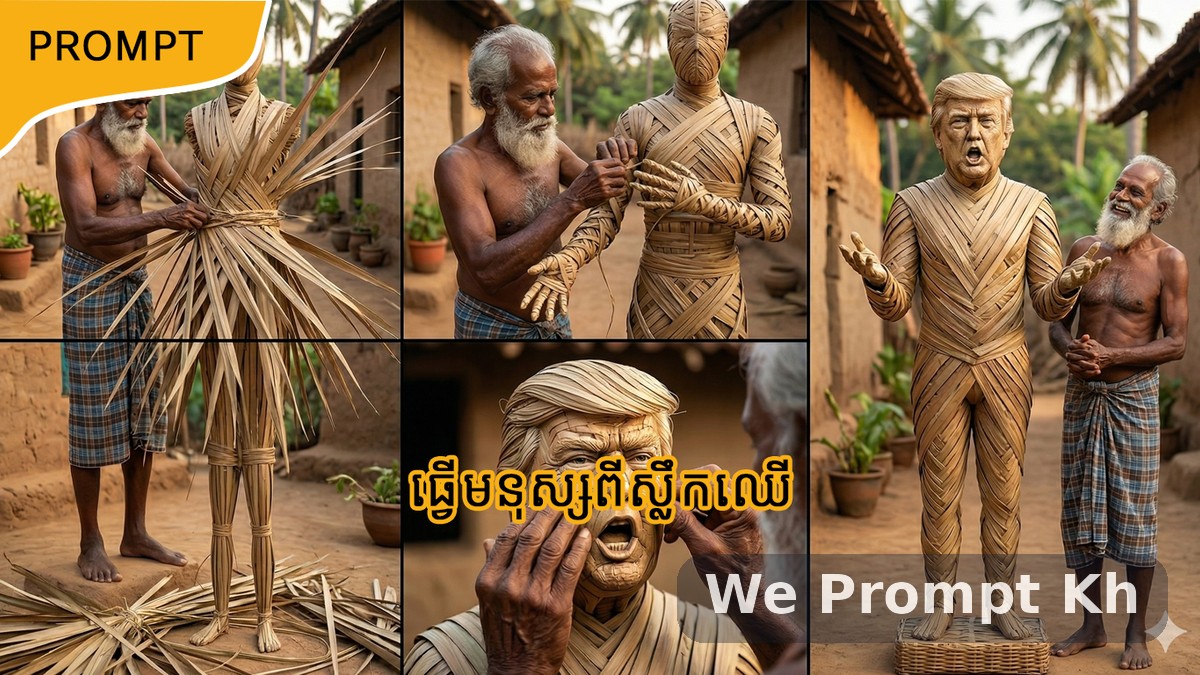
This master prompt is designed for creators who want to generate a highly consistent cinematic transformation story from still images into short AI videos. It focuses on a rural visual narrative in which an elderly Khmer village man gradually builds a life-size human statue entirely from fresh green palm leaves.
The structure is practical and production-friendly. It begins with two storyboard image prompts, each divided into four vertical panels, then continues with matching short Veo video prompts for each scene. This makes it ideal for creators who want a clear workflow from image generation to motion generation.
What this prompt creates
- Two ultra-realistic 4-panel storyboard image prompts
- A complete 8-scene visual story
- Strong visual continuity across all scenes
- Matching Veo video prompts for each cropped panel
- A realistic village setting with consistent character identity
Why this prompt works
This prompt is effective because it keeps the identity, environment, lighting, and statue design consistent from beginning to end. Instead of generating random disconnected scenes, it creates one clear narrative arc. The result feels more cinematic, more believable, and easier to convert into short-form visual content.
It also uses a strong transformation concept. The statue begins at the feet, rises through the legs and body, then reaches the head and final reveal. That natural build-up makes the sequence satisfying and easy for viewers to follow.
How the workflow is structured
Part 1 — Storyboard image generation
The first half of the workflow uses two storyboard images. Each image contains four vertical panels, giving you a total of eight connected scenes. All panels must preserve the same elderly man, the same standing palm-leaf statue, the same rural village environment, and the same natural daylight.
Part 2 — Veo video generation
After generating the grid images, each panel is cropped into an individual scene image. Those cropped images are then animated using separate Veo prompts. Each video lasts 8 seconds and focuses on a clear physical action such as examining the photo, pulling palm leaves, weaving the feet, building the legs, shaping the torso, forming the arms, crafting the face, and finally revealing the completed statue.
Best use cases
- AI short-film creation
- Storyboard-to-video workflows
- Transformation-style cinematic reels
- Rural craft or folk-inspired visual stories
- Veo, Kling, Runway, or similar image-to-video pipelines
Creative strengths of this prompt
- Strong scene continuity
- Clear 8-scene progression
- Ultra-realistic image direction
- Simple crop-and-animate workflow
- Powerful final reveal moment
Copy-ready master prompt
IMAGE 2 PROMPT — GRID 5–8 (Scenes 5–8)
Use the uploaded photo as a strict identity reference.
This image continues the same story and must match the first grid image perfectly.
Create a single ultra-realistic image divided into 4 equal vertical panels (4-grid storyboard).
Same elderly man, same statue, same village, same lighting.
Elder always standing.
Statue always standing.
Vertical 9:16.
Ultra-realistic photography.
ELDER:
Same elderly village man, white-grey beard, barefoot, dhoti or lungi.
STATUE:
Same palm-leaf statue design and proportions.
PANEL 5:
The elderly man is weaving palm leaves around the statue’s waist and chest.
PANEL 6:
The elderly man is forming both arms and hands of the statue using palm leaves.
PANEL 7:
The elderly man is shaping the head and face.
The face clearly resembles the uploaded photo.
PANEL 8:
Final reveal.
The completed full-body palm-leaf statue is standing upright.
The elderly man stands beside it proudly.
Ultra-realistic, natural daylight, village realism.
PART 2: VEO 3.1 VIDEO PROMPTS
Crop each grid panel.
Upload one cropped image per scene.
Use the matching prompt below.
SCENE 1 VIDEO PROMPT (8s)
Animate this image into an 8-second ultra-realistic video.
Fast, focused motion.
The elderly man quickly lifts and scans the photo.
Sharp head and hand movement.
Vertical 9:16.
SCENE 2 VIDEO PROMPT (8s)
Animate this image into an 8-second ultra-realistic video.
Quick, energetic motion pulling fresh palm leaves.
Leaves move actively.
Vertical 9:16.
SCENE 3 VIDEO PROMPT (8s)
Animate this image into an 8-second ultra-realistic video.
Rapid hand movements weaving palm leaves onto the statue’s feet.
Clear progress within seconds.
Vertical 9:16.
SCENE 4 VIDEO PROMPT (8s)
Animate this image into an 8-second ultra-realistic video.
Fast weaving motion moving upward along the legs.
Continuous hand action.
Vertical 9:16.
SCENE 5 VIDEO PROMPT (8s)
Animate this image into an 8-second ultra-realistic video.
Quick wrapping of palm leaves around waist and chest.
Energetic craftsmanship.
Vertical 9:16.
SCENE 6 VIDEO PROMPT (8s)
Animate this image into an 8-second ultra-realistic video.
Rapid shaping of arms and fingers.
Hands move constantly.
Vertical 9:16.
SCENE 7 — FAST (Head & Face)
Animate this image into an 8-second ultra-realistic video.
Fast, precise shaping of facial features.
Face becomes clearly defined.
Vertical 9:16.
SCENE 8 — FAST (Final Reveal)
Animate this image into an 8-second ultra-realistic video.
Dynamic camera movement revealing the full standing statue.
The elderly man gives a quick proud look.
Strong, fast ending.
Vertical 9:16.
Final thought
This prompt is a strong choice for creators who want a realistic transformation story with visual consistency and clear motion planning. It bridges still-image generation and short-video generation in a way that is easy to execute, cinematic in structure, and highly reusable for similar narrative builds.