Published post
Master Guide: How to Create Consistent Characters in Midjourney and Flux (2026)
One of the biggest challenges for AI video creators, storytellers, and brand marketers is character consistency . When generating storyboards for AI videos (Runway, Kling, Sora, o…
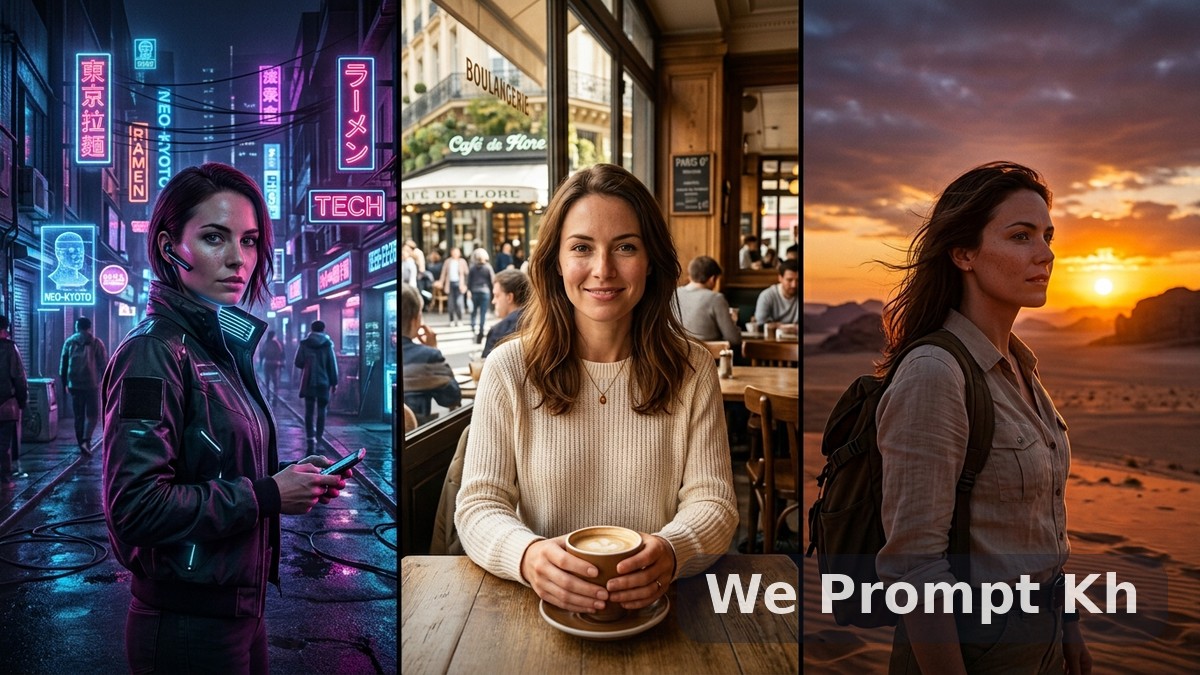
One of the biggest challenges for AI video creators, storytellers, and brand marketers is character consistency.
When generating storyboards for AI videos (Runway, Kling, Sora, or Luma Dream Machine), having your character’s face, clothing, hairstyle, and age change in every single scene ruins the entire story.
In this master guide, you will learn the exact 4-step character anchoring framework and copy-and-paste master prompts to lock your character across infinite scenes, camera angles, and lighting conditions in Midjourney v6.1 and Flux.1.
4. Midjourney Character Reference (
| Parameter | Recommended Setting | Best Used For |
| :--- | :--- | :--- |
|
The 4-Pillar Character Anchor Formula
To get 95%+ facial and outfit consistency, every prompt must contain these 4 anchors:- Specific Identity Descriptor: Avoid generic terms like "a beautiful woman". Use specific nationality, age, hair type, eye color, and distinct facial traits (e.g., "26-year-old Cambodian-French female architect with sharp jawline, high cheekbones, dark amber almond eyes, shoulder-length messy wavy black hair with subtle caramel highlights").
- Signature Uniform / Outfit: Define the core wardrobe (e.g., "wearing an oversized vintage beige trench coat over a ribbed charcoal turtleneck sweater").
- Consistent Camera & Lens Setup: Stick to uniform focal lengths (e.g., "shot on 85mm f/1.4 lens, 35mm film grain, cinematic documentary lighting").
- Reference Parameters: Use
--cref [URL] --cw 80in Midjourney orLoRA / seed lockin Flux.
1. Scene 1: The Master Character Sheet (Front & 3-Angle View)
Before generating individual story scenes, create your base character turn-around sheet:Prompt 1: Full Character Model Sheet
Copy Prompt:
"Character turnaround model sheet, 3 distinct poses: front view, 45-degree three-quarter view, and side profile of a 28-year-old male Southeast Asian creative director, defined jawline, modern undercut textured hair, light stubble beard, warm caramel skin tone. Wearing a minimalist matte navy bomber jacket with a clean white crewneck tee. Neutral soft grey studio background, photorealistic, 8k resolution, Hasselblad 85mm portrait lens, ultra-detailed skin pores and realistic fabric texture --ar 16:9 --v 6.1 --style raw"
2. Generating Different Camera Angles & Poses
Once you have your reference image, use the same Character Anchor with scene-specific camera commands:Prompt 2: Cinematic Close-Up (Dialogue Scene)
Copy Prompt:
"[CHARACTER ANCHOR], extreme close-up portrait shot, intense emotional expression, looking directly into the camera with slight curiosity, cinematic depth of field, golden hour backlight creating warm rim light on hair, high-end cinema film still, 35mm photography --ar 16:9 --v 6.1 --cref [IMAGE_URL] --cw 90"
Prompt 3: Dynamic Action / Walking Shot (Wide Angle)
Copy Prompt:
"[CHARACTER ANCHOR], full body wide-angle shot, walking briskly through a rain-slicked modern urban neon street in Tokyo, dramatic reflections on wet asphalt, motion blur in the background, cinematic low angle perspective, anamorphic lens flare --ar 16:9 --v 6.1 --cref [IMAGE_URL] --cw 85"
Prompt 4: Over-the-Shoulder Interaction Shot
Copy Prompt:
"[CHARACTER ANCHOR], over-the-shoulder medium shot sitting at a cozy dimly lit cafe table, sipping espresso while reviewing blueprints on an iPad, warm soft tungsten ambient lighting, shallow depth of field with blurred foreground, photorealistic cinematic film still --ar 16:9 --v 6.1 --cref [IMAGE_URL] --cw 85"
3. Changing Emotions Without Changing the Face
Use emotional modifiers while keeping the identity anchor intact:Prompt 5: Joy & Laughter
Copy Prompt:
"[CHARACTER ANCHOR], candid laughing expression, head tilted slightly, crinkled smile lines around eyes, natural candid photography, soft daylight coming from side window, ultra-realistic skin texture --ar 16:9 --v 6.1 --cref [IMAGE_URL] --cw 95"
Prompt 6: Suspense / Fear / Tension
Copy Prompt:
"[CHARACTER ANCHOR], tense and alert facial expression, wide eyes, furrowed brow, looking over shoulder into shadows, dramatic high-contrast chiaroscuro lighting, dark thriller movie atmosphere --ar 16:9 --v 6.1 --cref [IMAGE_URL] --cw 95"
4. Midjourney Character Reference (--cref) Cheat Sheet
| Parameter | Recommended Setting | Best Used For |
| :--- | :--- | :--- |
| --cref [URL] | Link to your Master Image | Links the facial features directly to your reference |
| --cw 100 (Default) | Face + Hair + Clothing | Best when keeping the exact same outfit |
| --cw 0 | Face only | Best when you want to change clothes in new scenes |
| --cw 80 | Face + Hair style | Ideal balance for cinematic video storytelling |
Pro-Tips for Turning Character Images into Cinematic AI Videos
- Fix Resolution with Upscalers: Upscale your images with Magnific AI or Topaz before feeding into video models (Kling, Runway Gen-3, or Luma).
- Keep the Camera Direction Consistent: If scene 1 ends with character looking right, start scene 2 with character entering from the left.
- Use Start & End Frames in Video AI: Use the front image as the start frame and dynamic pose as the end frame for seamless motion.
Frequently Asked Questions (FAQ)
What is the best Midjourney version for consistent characters?
Midjourney v6.1 with the--cref (character reference) and --cw (character weight) parameters currently provides the highest facial consistency.
How do I change the character's clothing without changing the face?
Add--cw 0 at the end of your prompt. This instructs the AI model to only transfer facial likeness while allowing you to describe a brand-new outfit in the prompt.