Published post
AI Video Workflow: The Drone-View Architectural Construction Pipeline
Creating architectural visualizations with AI is highly lucrative, but it presents a unique technical hurdle: maintaining a perfectly static camera angle while the environment dra…
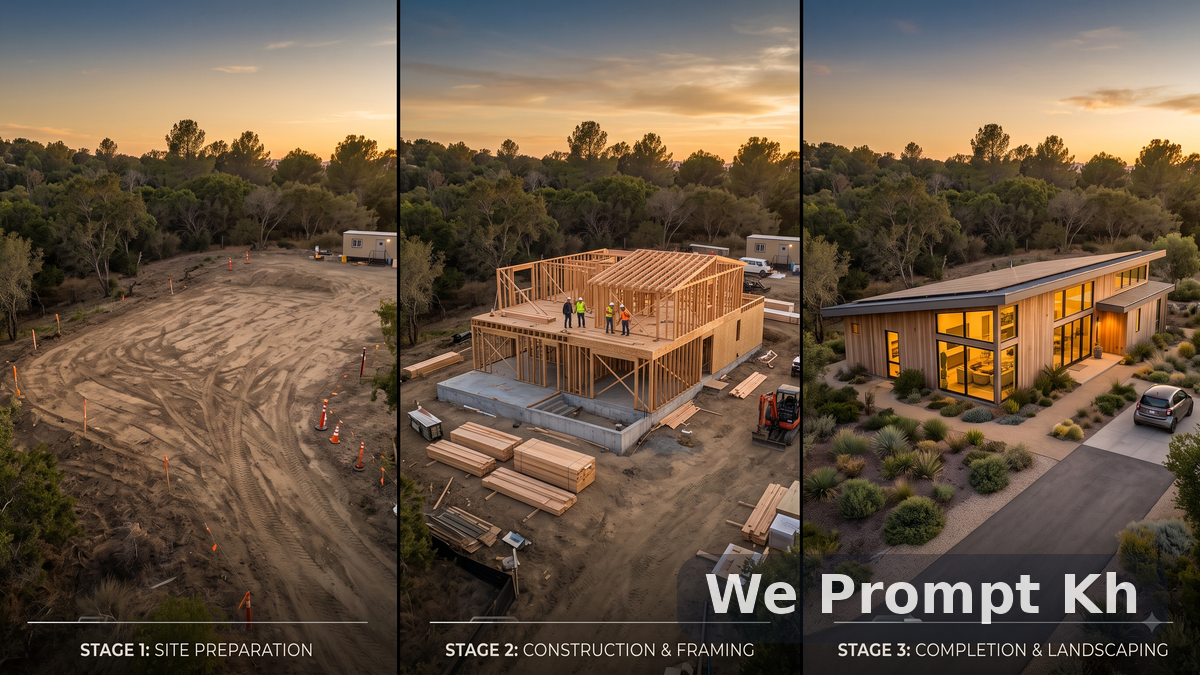
Creating architectural visualizations with AI is highly lucrative, but it presents a unique technical hurdle: maintaining a perfectly static camera angle while the environment drastically changes.
If you want to show a building being constructed from the ground up over a 15-second video sequence, you cannot just ask the AI to "build a house." The AI will constantly shift the camera, change the lighting, or render the structure in a glossy 3D style rather than a photorealistic DSLR aesthetic.
This article provides a complete B2B Master Prompt Workflow for generating an ultra-realistic, step-by-step construction time-lapse from a locked drone perspective.
The Objective: The Modern Eco-Villa Build
We will generate a 4-stage progressive sequence. To ensure a professional, highly marketable result, we will strictly instruct the AI to avoid generic 3D CAD aesthetics, pushing for ultra-realistic drone photography.
Part 1: The Iterative Workflow Strategy
To prevent the landscape from shifting between clips, you must use an Image-to-Video or Video-to-Video pipeline (using tools like Veo, Sora, or Runway Gen-3).
Establish the Base: Generate the raw land exactly as you want it.
Lock the Drone: Every subsequent prompt MUST include identical camera and lighting instructions.
Seed Referencing: Use the final frame of the previous stage as the visual input for the next stage.
Part 2: The Progressive Master Prompt Chain
Technical Note: Keep the bracketed instructions
[Camera]and[Lighting]identical across all prompts to lock the visual seed.
Stage 1: The Raw Plot (0% Complete)
STAGE 1 PROMPT:
[Camera: Aerial drone perspective, locked hovering static shot, looking down at a 45-degree angle. Ultra-realistic DSLR photography, not 3D.]
[Subject State: A raw, cleared rectangular plot of dirt in the center of a lush green tropical forest. Heavy tire tracks in the mud. No structure exists yet. A few orange construction cones outline the perimeter.]
[Lighting: Overcast, soft diffused natural daylight.]
Stage 2: Foundation & Framing (30% Complete)
STAGE 2 PROMPT:
[Reference: Final frame of STAGE 1.]
[Camera: Aerial drone perspective, locked hovering static shot, looking down at a 45-degree angle. Ultra-realistic DSLR photography, not 3D.]
[Subject State: The cleared dirt plot now features a poured concrete foundation. Wooden structural framing is being erected for a two-story modern villa. Scaffolding surrounds the raw timber. Construction materials are neatly stacked on the side.]
[Lighting: Overcast, soft diffused natural daylight.]
Stage 3: Exterior Shell (70% Complete)
STAGE 3 PROMPT:
[Reference: Final frame of STAGE 2.]
[Camera: Aerial drone perspective, locked hovering static shot, looking down at a 45-degree angle. Ultra-realistic DSLR photography, not 3D.]
[Subject State: The modern eco-villa exterior is nearly finished. Matte black metal roofing is installed. Large floor-to-ceiling glass windows are in place but covered in protective film. The surrounding dirt is being smoothed out for landscaping.]
[Lighting: Overcast, soft diffused natural daylight.]
Stage 4: The Finished Masterpiece (100% Complete)
STAGE 4 PROMPT:
[Reference: Final frame of STAGE 3.]
[Camera: Aerial drone perspective, locked hovering static shot, looking down at a 45-degree angle. Ultra-realistic DSLR photography, not 3D.]
[Subject State: The completed modern eco-villa. Flawless architectural design with warm wood accents and pristine glass windows. The surrounding landscape is perfectly manicured with a stone driveway and tropical plants.]
[Lighting: Golden hour. Warm, beautiful sunset light casting long dramatic shadows. Interior warm lights of the villa are turned on, creating a glowing contrast.]
Troubleshooting Camera Drift
If the "drone" starts flying forward or panning during generation, you need to tighten the negative constraints.
In your tool's negative prompt box (or appended to the end of your main prompt if a negative box isn't available), add:
Negative: camera panning, camera zooming, camera movement, flying, shifting perspective, 3D render, glossy plastic, CAD model.