Published post
AI Video Workflow: How to Generate A Seamless 0% to 100% 'Progress Complete' Animation
Maintaining visual continuity across a sequence of generated videos is the single biggest challenge in AI filmmaking. If you try to generate six different clips showing a statue b…
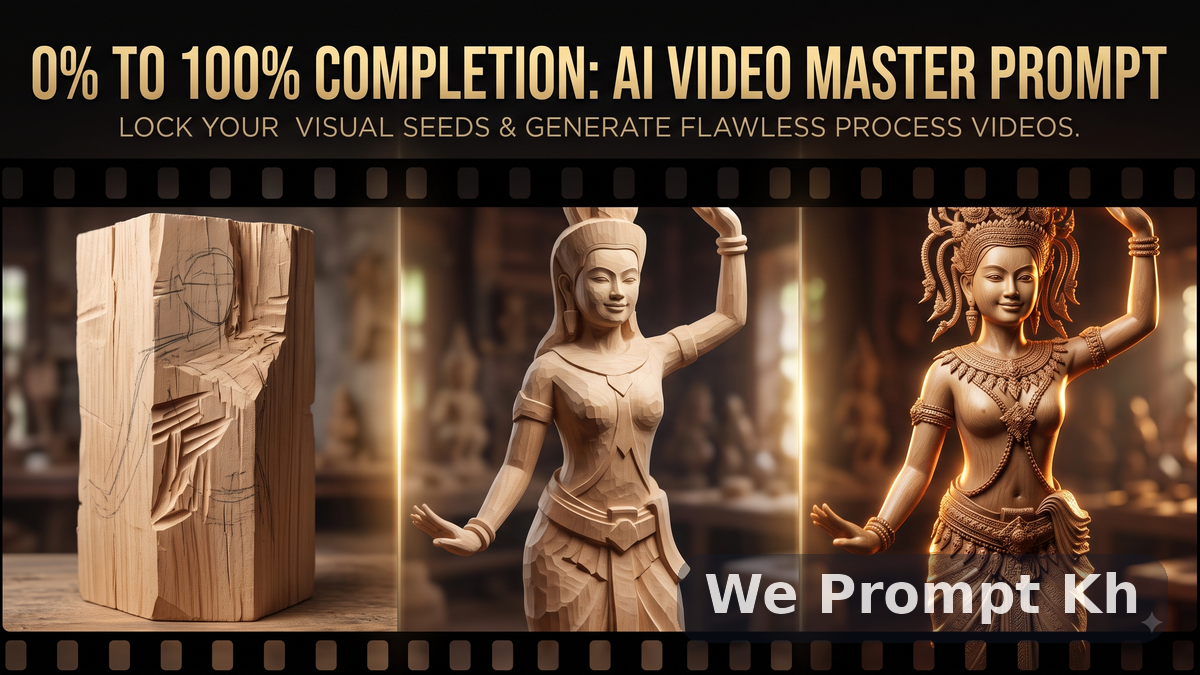
Maintaining visual continuity across a sequence of generated videos is the single biggest challenge in AI filmmaking. If you try to generate six different clips showing a statue being carved, the face will inevitably drift, the lighting will shift, and the final 100% complete shot will look like a different character.
To create an effective, viral "process" video, you must maintain a consistent visual seed and precise camera control. The secret isn't just in the first prompt—it is in the chain.
This article provides a multi-stage Master Prompt designed for tools like Veo 3.1 or Kling 2.6, guiding you through a structured 0% to 100% generation pipeline.
The Objective: The Khmer Wood Carving Progression
We will use a culturally specific example to prove technical mastery: generating the flawless transformation of a rough wood block into a photorealistic, intricate Khmer Apsara dancer sculpture. This pipeline maintains perfect lighting and subject integrity.
Part 1: The Iterative Workflow
This process is not "one prompt, one output." It is a 6-step cycle of technical orchestration.
Generate base imagery: Start with the first stage only (the raw material).
Generate intermediate clip: Use the final frame of Stage 1 as a reference or visual seed for Stage 2. (This is essential for locking the geometry).
Refine the Master Prompt: In each subsequent prompt, keep the camera language and lighting descriptions identical. Only change the "Description of Subject State."
Lock Visual Seeds: When using SOTA (State of the Art) models in 2026, always lock your spatial coordinates and ensure the noise scheduler (like DPM++) is consistent.
Part 2: The Progressive Master Prompt Chain
This structured workflow is optimized for tools that allow image-to-video or video-to-video reference.
Technical Note: All prompts in this sequence must keep the following consistent:
Camera: Slow push-in, low angle, extreme macro detail.
Lighting: Warm, golden-hour rim lighting, deep shadows, shallow depth of field.
Style: Ultra-realistic, cinematic photo.
0% Completion: The Raw Material
STAGE 1 PROMPT (0% complete):
[Subject Definition: A large, recently split block of raw, untreated Cambodian rosewood, rough texture.] [Action: A close-up, slow cinematic push-in on the wood grain.] [State: Faint, almost invisible pencil guidelines outline a complex Apsara figure geometry on the surface. The wood is untouched, showing deep gouges and rough split marks.] [Lighting: Intense warm rim light from the right.]
25% Completion: Primary Geometry Defined
STAGE 2 PROMPT (25% complete):
[Reference: Final frame of STAGE 1.] [Subject Definition: The Cambodian rosewood block from Stage 1.] [Action: The same slow cinematic push-in.] [State: Deep chisel gouges have defined the primary shape of an Apsara dancer sculpture. The geometry is visible, but raw. Large sections of wood are still formless. Sharp chisel marks are clearly visible.]
50% Completion: Features Emerge
STAGE 3 PROMPT (50% complete):
[Reference: Final frame of STAGE 2.] [Subject Definition: The half-carved Cambodian rosewood sculpture.] [Action: The same slow cinematic push-in.] [State: Significant progress. The delicate facial features of the Apsara dancer are defined. The outline of her elaborate headpiece is visible. Smooth surfaces are now apparent, contrasting with raw chisel marks in the background.]
75% Completion: Detailed Textures
STAGE 4 PROMPT (75% complete):
[Reference: Final frame of STAGE 3.] [Subject Definition: The mostly carved Cambodian rosewood sculpture.] [Action: The same slow cinematic push-in.] [State: The intricate detail of the Apsara dancer’s headpiece, the folds of her silk sampot, and the jewelry on her arms are nearly complete. The sculpture is highly detailed. Only minor textural refinement is needed. Chisel marks are almost gone.]
100% Completion: Photorealistic Polished
STAGE 5 PROMPT (100% complete):
[Reference: Final frame of STAGE 4.] [Subject Definition: The fully completed Cambodian rosewood Apsara sculpture.] [Action: The same slow cinematic push-in.] [State: A masterpiece of intricate traditional craftsmanship. The Apsara figure is polished and flawless. Warm cinematic rim light highlights the perfect smooth wood texture and the incredible macro detail of her jewelry and smile. No chisel marks remain. The result is photorealistic.]
Troubleshooting Visual Drift
If you notice the background of your subject beginning to drift in texture (e.g., the wood shifts from rosewood to teak), you must enforce visual consistency.
In 2026 workflows, this is often done in two ways:
Positive Prompt Reinforcement: Add specific constraints to every prompt:
(Same specific Cambodian rosewood texture block from all preceding scenes: 1.5). The weight '1.5' signals high importance.Static Reference Frame: When generating video-to-video, ensure your reference frame is static. If the reference video has motion, the model will struggle to apply the 100% detail overlay to a moving target.
Final Summary
By chaining these generations, you lock the complex spatial geometry. The raw block must become the statue. This methodology applies to complex architectural sequences, aging effects, or any progressive growth animation. Mastering this orchestration is what separates a quick prompt engineer from a technical AI artist.