Published post
Monkey Story Master Prompt for AI Image and Video Scenes
A complete master prompt for creating a cinematic monkey story with one consistent character, 11 scene ideas, scene-by-scene image prompts, and matching animation prompts.
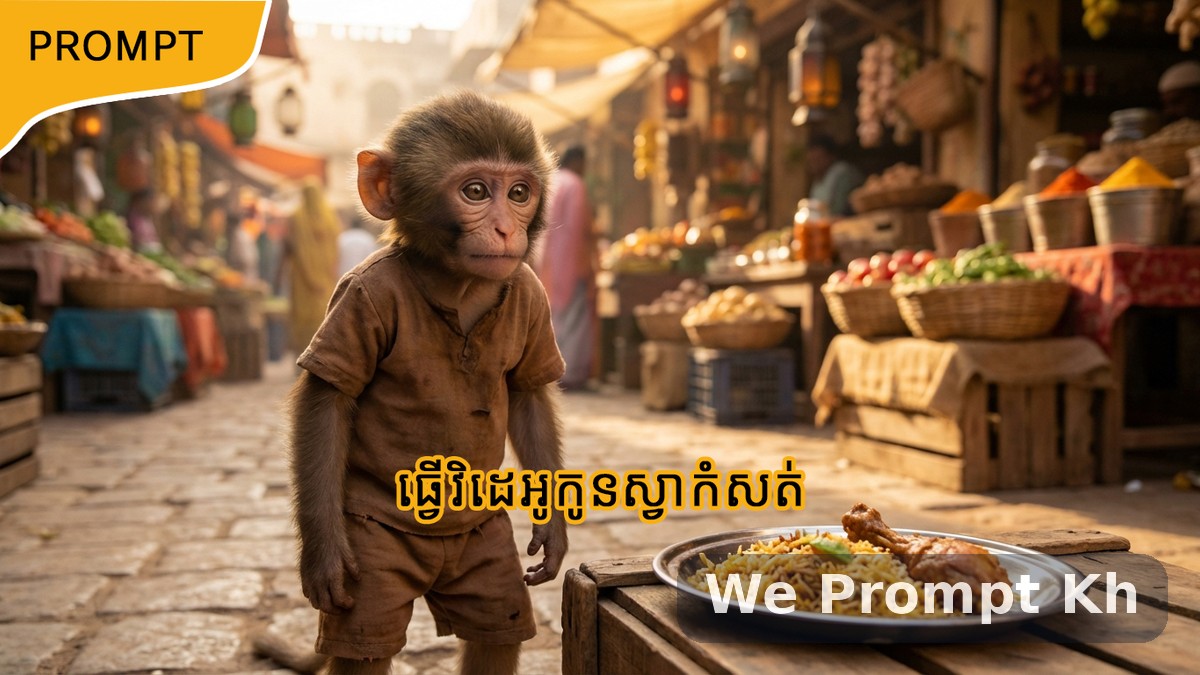
This master prompt is designed for creators who want to build a complete AI-generated visual story using one consistent monkey character across image and video scenes. It combines character design, story generation, scene-by-scene image prompts, and scene-wise animation prompts into one practical workflow.
The story itself follows a dramatic but family-friendly emotional arc. A hungry monkey steals food from a market, gets chased, hides, and later reveals that the stolen food was meant for his hungry little siblings. The human who first reacts with anger eventually understands the truth, returns with food, and shares a peaceful ending with the animals.
What this prompt is built to do
This system is useful because it separates the process into three clear parts. First, it defines the monkey character with a highly detailed portrait prompt. Second, it generates a story structure and detailed scene prompts for still images. Third, it creates animation prompts that bring those finished scene images to life without changing the character identity or the story logic.
Why this prompt works well
- It keeps one strong character identity from beginning to end.
- It follows strict cause-and-effect storytelling.
- It avoids random changes in appearance between scenes.
- It works well for both image generation and image-to-video animation.
- It keeps the emotional arc clear and easy to follow.
How the workflow is structured
Character image prompt
The first part creates a premium cinematic portrait of the monkey. This is extremely important because every later scene depends on this image as the only character reference. The monkey is styled as a baby monkey with expressive human-like eyes, realistic fur, simple clothing, cinematic lighting, and a clean shallow-depth portrait look. This step creates a stable identity that should never change later.
Step 1 — Story idea generation
The second part generates an 11-scene story in very simple English. The setting is a busy local market or street, and the emotional tone moves from struggle to tension, then to emotional revelation and a heartwarming ending. Each scene is short, visual, and suitable for 5 to 8 second video clips.
Step 2 — Scene-wise image prompts
Once the story is selected, the prompt generates one image prompt for each scene. This part is highly structured. Each scene must be a completely separate image prompt. The monkey character must stay exactly the same in face, body, clothing, and identity. Only action, emotion, environment, and camera composition change based on the story moment.
The visual direction also includes a strong desi Indian atmosphere. That means the market setting, textures, colors, and lighting should feel grounded in Indian realism across all scenes.
Step 3 — Scene-wise animation prompts
After all images are created, the final step generates animation prompts for each scene. These prompts do not redesign the character. They only animate the already-generated images by adding subtle natural motion. This keeps the result visually stable while allowing each scene to feel alive.
Best use cases
- AI short-film creation
- Cinematic animal story videos
- Storyboard-based image-to-video workflows
- Consistent character storytelling with AI
- Emotional short-form video content
Why creators can reuse this framework
This prompt is more than a single monkey story. It is a reusable production structure. You can adapt the same system for other animals, other emotional stories, and other local settings while keeping the same three-step pipeline: define the character, generate the scene logic, and animate the results.
That makes it especially useful for creators who want consistency, emotional clarity, and practical control over the final output.